Itech - Juzaweb CMS Theme
iTech is a powerful and versatile theme designed specifically for tech-focused newspapers, blogs, and magazines. It is optimized for high-frequency content publishing, detailed product reviews, and delivering a modern news experience to tech enthusiasts.
Whether you are launching a tech news portal, a gadget review site, or a niche software blog, iTech provides the robust structure and sleek design needed to stand out.
Requirements
- PHP ^8.2
- Juzaweb CMS: Core (^5.0)
- Plugins:
juzaweb/blog (dev-master)juzaweb/ads-manager (dev-master)
Installation
You can install the Itech theme via Composer or through the Juzaweb Admin Panel.
Via Composer
To install the theme using Composer, run the following command in your Juzaweb project root:
composer require juzaweb/itech
Via Admin Panel
- Log in to your Juzaweb Admin Panel.
- Navigate to Appearance > Themes.
- Click Add New and upload the theme package.
- Activate the Itech theme.
Setup & Configuration
Upon activation, the theme automatically configures essential settings, including the Home Page, Sidebar, and Footer Menu.
Automated Setup
The theme includes a seeder that automatically:
- Sets up the Home Page template with pre-configured blocks.
- Populates the Sidebar with 'Most Popular' and 'Tags Cloud' widgets.
- Creates a Footer Menu with links to Privacy Policy and Terms of Service (if pages exist).
Manual Configuration
You can further customize the theme through the Admin Panel:
Theme Settings
Navigate to Appearance > Theme Settings to configure your social media links:
- Facebook
- X (Twitter)
- Instagram
- YouTube
- LinkedIn
Menus
The theme supports two menu locations:
- Main Menu: The primary navigation bar.
- Footer Menu: Links displayed in the footer area.
Go to Appearance > Menus to create and assign your menus.
Widgets
The Sidebar widget area is designed for blog posts and archives. Recommended widgets include:
- Most Popular: Displays your most viewed posts.
- Tags Cloud: Displays a cloud of popular tags.
Go to Appearance > Widgets to manage your sidebars.
Ads Manager
If you have the juzaweb/ads-manager plugin installed, you can configure ad slots in the following positions:
- Home Top: Banner ad (300x250) displayed at the top of the home page.
- Sidebar Top: Banner ad (300x250) displayed at the top of the sidebar.
Page Templates
Home Page
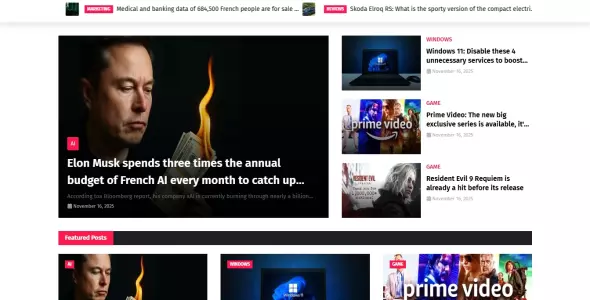
The Home page template is a widgetized page designed to showcase your content dynamically. It includes the following blocks:
- Breaking News Carousel: A dynamic carousel displaying the latest breaking news.
- Hot Posts: A section highlighting trending or hot posts.
- Featured Posts: A curated list of featured articles.
To edit these blocks, navigate to the page editor for your Home page.
Key Features
📰 Advanced News Layouts
- Multiple grid and list layouts optimized for news consumption.
- Featured content sections to highlight breaking news and trending topics.
- Clean and professional typography for enhanced readability.
🛠️ Tech-Focused Publishing
- Specialized layouts for product reviews and tech specifications.
- Support for high-frequency publishing with efficient content discovery.
- Dynamic widgets for popular posts, recent updates, and categories.
🚀 Performance & Speed
- Built with a focus on fast loading times for high-traffic environments.
- Optimized assets and code to ensure a smooth user experience.
- SEO-friendly architecture to help your articles rank higher in search results.
📁 Content Organization
- Advanced category and tag management for complex tech topics:
- Hardware & Gadgets
- Software & Apps
- Artificial Intelligence
- Cybersecurity
- Mobile Tech & more
🌍 Multi-language & Localization
- Built-in support for multiple languages to reach a global tech audience.
- Fully translatable interface for localized news sites.
📱 Fully Responsive Design
- Mobile-first approach that looks stunning on smartphones and tablets.
- Seamless navigation for readers on the go.
🛡️ Powered by Juzaweb CMS
- Leveraging the security and scalability of Juzaweb CMS.
- Easy management of articles, media, and users via the admin dashboard.
- Reliable infrastructure for growing digital publications.
Development
If you want to contribute or customize the theme development:
Asset Compilation
This theme uses Laravel Mix for asset compilation. To build the assets:
# Install dependencies
npm install

# Build for production
npm run prod

# Watch for changes
npm run watch
Testing
To run the test suite:
vendor/bin/phpunit
License
This theme is open-sourced software licensed under the MIT license.
Support
For documentation and support, please visit Juzaweb CMS.


 0 sales

 Recently Updated




0 Comments